> ## Documentation Index
> Fetch the complete documentation index at: https://docs.codenullapp.com/llms.txt
> Use this file to discover all available pages before exploring further.

# Multimedia

> There are two types of Multimedia,&#x20;

There are two types of Multimedia,&#x20;

* Documents
* Images

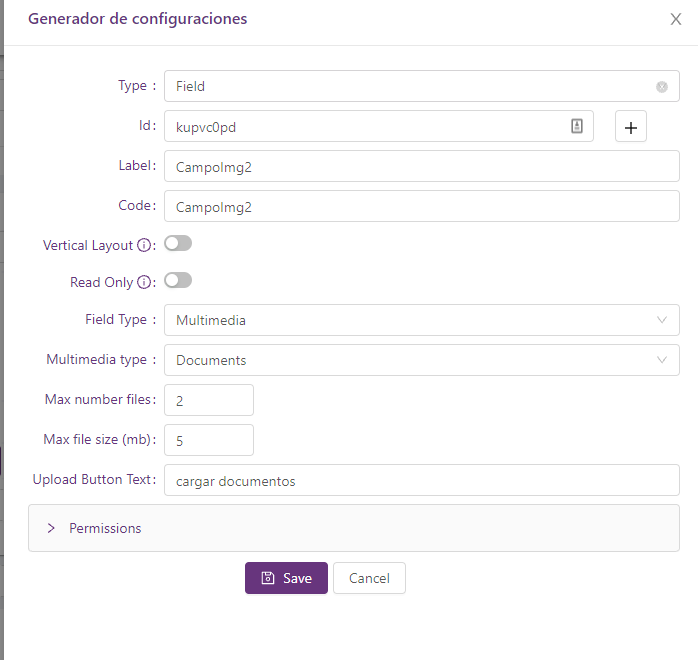
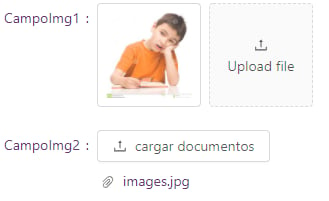
If you choose documents will allow you to upload whatever type of files

If you choose images will allow you to upload only images (png, jpg)

<img src="https://mintcdn.com/codenull/fUND-Qmj85v5Oam-/images/irZEFZ3QnaD4YTJMrVSH.png?fit=max&auto=format&n=fUND-Qmj85v5Oam-&q=85&s=4efcfc152937cb87b198c3224e1e1320" alt="" width="698" height="660" data-path="images/irZEFZ3QnaD4YTJMrVSH.png" />

**Max number files**: You can set the max number of files allowed to upload in that control

Max file size: You can set the max file size allowed to upload, if you don't set any value the default will be 2MB

**Upload Button text**: You can set the title of the action to upload files
<img src="https://mintcdn.com/codenull/9RtgKoAtzvpYtN-c/images/2tdcyUXrf6GiDzzciaie.png?fit=max&auto=format&n=9RtgKoAtzvpYtN-c&q=85&s=9fb37851a98fa43ae6868f09f1e8aed8" alt="" width="329" height="201" data-path="images/2tdcyUXrf6GiDzzciaie.png" />

### Documents

#### Preview Mode

When you have a multimedia field configured as Documents, you have two ways of previewing the documents

<figure>
  <img src="https://mintcdn.com/codenull/9RtgKoAtzvpYtN-c/images/F7zJmAam97HLMsZMCSBT.png?fit=max&auto=format&n=9RtgKoAtzvpYtN-c&q=85&s=630507164870542eb67c038750a1b472" alt="" width="800" height="182" data-path="images/F7zJmAam97HLMsZMCSBT.png" />

  <figcaption />
</figure>

* **Modal** (*Default*): Allows rendering the document preview in a modal.
* **Inline**: Allows rendering the document preview below the field on the same page.

<figure><img src="https://mintcdn.com/codenull/9RtgKoAtzvpYtN-c/images/R7cCvVkysZIhiRvk9Ugq.png?fit=max&auto=format&n=9RtgKoAtzvpYtN-c&q=85&s=4d90a84bde76f6bb526f82ad3bff98f1" alt="" width="1286" height="720" data-path="images/R7cCvVkysZIhiRvk9Ugq.png" /><figcaption><p>Inline Preview</p></figcaption></figure>
