> ## Documentation Index
> Fetch the complete documentation index at: https://docs.codenullapp.com/llms.txt
> Use this file to discover all available pages before exploring further.
# How to Open a Feature on a Modal
> We have a GridList with a Global Action that says "Add Product" and we want to open a form to add a new Product, if we want to open that feature as a modal you
### Not passing parameters to the modal
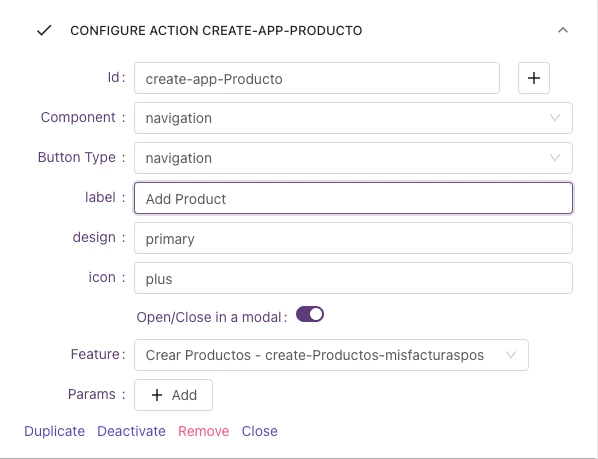
We have a GridList with a Global Action that says "Add Product" and we want to open a form to add a new Product, if we want to open that feature as a modal you should the following steps:
1. Go to the designer of the GridList feature
2. In the Global Actions Configuration section check the option "Open/Close in a modal"
3. Select the feature you want to open on the Modal. The final configuration should looks like the next image:
 ### Passing parameters to the modal
This is useful when we want to edit an item in a modal and we want the `Id` from the context of the Row
In the same GridList, once the user clicks any item, we want to open a Feature with the details of the selected item, to achieve that we would need to pass parameters
#### On the feature that will open the modal...
1. Go to the designer of the GridList feature
2. In the Default Click Actions Configuration section check the option "Open/Close in a modal"
3. Select the feature you want to open on the Modal.
4. Besides that, configure the params (On the Params option) you want to pass to the Feature you want to open in the modal. In this case, we want to pass the Id that comes from the context
### Passing parameters to the modal
This is useful when we want to edit an item in a modal and we want the `Id` from the context of the Row
In the same GridList, once the user clicks any item, we want to open a Feature with the details of the selected item, to achieve that we would need to pass parameters
#### On the feature that will open the modal...
1. Go to the designer of the GridList feature
2. In the Default Click Actions Configuration section check the option "Open/Close in a modal"
3. Select the feature you want to open on the Modal.
4. Besides that, configure the params (On the Params option) you want to pass to the Feature you want to open in the modal. In this case, we want to pass the Id that comes from the context
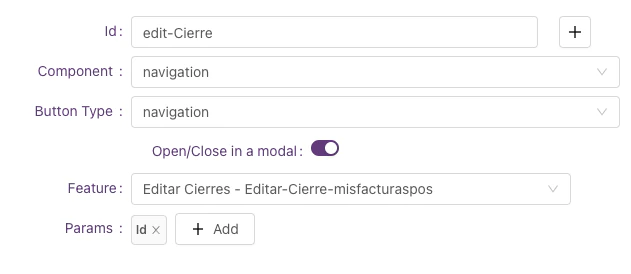 If you don't define any parameter the entire data item of the GridRow will be passed to the modal
#### On the Feature that will be opened...
Now we need to make sure that the feature that will be opened in the modal, receives those parameters from the context in the data source.
1. Go to the designer of the feature that needs to be opened
2. On the datasource add the received parameters. In this case, we want the `id` variable from the context
If you don't define any parameter the entire data item of the GridRow will be passed to the modal
#### On the Feature that will be opened...
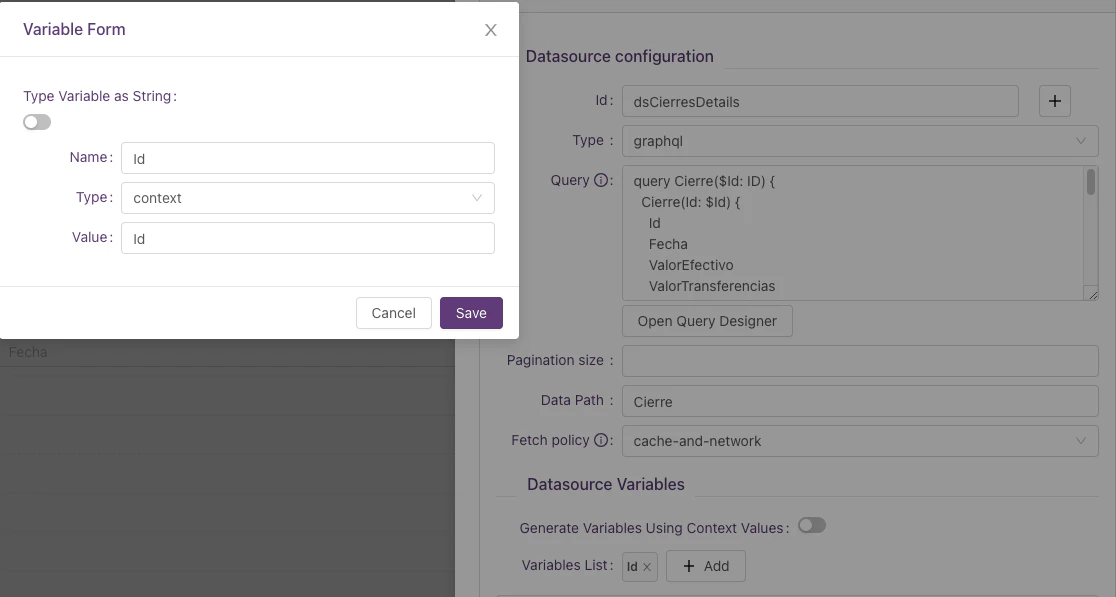
Now we need to make sure that the feature that will be opened in the modal, receives those parameters from the context in the data source.
1. Go to the designer of the feature that needs to be opened
2. On the datasource add the received parameters. In this case, we want the `id` variable from the context
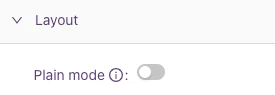
 Tip: To avoid double cards on the modal don't forget to enable the "Plain mode" check on the Layout section
 This only works for Navigation Buttons
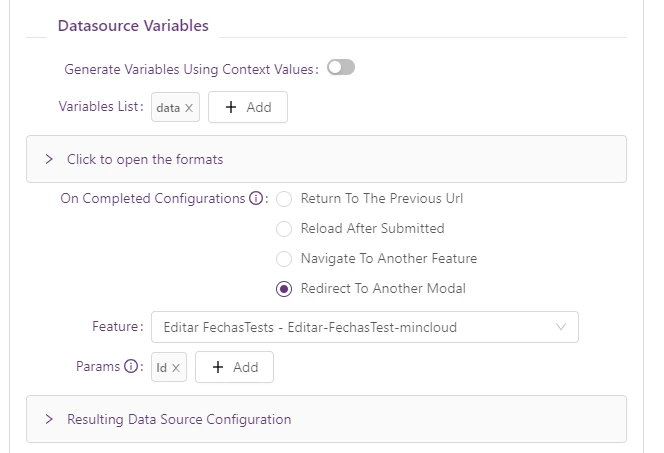
### Redirect between Modals
Redirect from a Modal to another Modal, (e.g. Adding a new record when it is created can be shown in Edit mode in the same modal)
* if you want to use it, go to the submit Datasource form in the designer and configure the new onCompleted option "Redirect To Another Modal"
This only works for Navigation Buttons
### Redirect between Modals
Redirect from a Modal to another Modal, (e.g. Adding a new record when it is created can be shown in Edit mode in the same modal)
* if you want to use it, go to the submit Datasource form in the designer and configure the new onCompleted option "Redirect To Another Modal"
 ##
##