> ## Documentation Index
> Fetch the complete documentation index at: https://docs.codenullapp.com/llms.txt
> Use this file to discover all available pages before exploring further.
# Hooks
> Common: reusable logic
## Hooks types
**Common**: reusable logic
[**Import**: Allows to import excel files](/dev/configurations/hooks/import-excel-files.md)
[Send Notification (web)](/dev/configurations/hooks/notifications.md)
[Scheduled Jobs](/dev/configurations/hooks/scheduled-jobs.md)
[Generate QR Code](/dev/configurations/hooks/generate-qr-code.md)
## Send Emails
* From: Email address from where you want to send the email, It is not required if was configured in the application designer
* To: Email address of the destination person
* Subject: Subject of the email (text plain)
* Message: The body of the email can be in HTML format or Text Plain.
To know more about the allowed email options please read [nodemailer](https://nodemailer.com/about/) docs
```javascript theme={null}
const sendEmail = require("./utils/mailSender").default;
//...
const options ={
from: 'correo@gmail.com',
to: 'correo@gmail.com',
subject: 'subject of the email',
message: 'message of the email in HTML format or TEXT plain'
}
await sendEmail(options);
```
## [Documentation for Sending Emails with Base64 Attachments (backend, hooks)](/dev/configurations/integrations/sending-emails-with-attachments-in-your-application-frontend.md#documentation-for-sending-emails-with-base64-attachments-backend-hooks)
#### Override email provider settings
If you want to use a different mail provider you can pass that configuration as a second parameter of the sendEmail function
```javascript theme={null}
const sendEmail = require("./utils/mailSender").default;
//...
const options ={
from: 'correo@gmail.com',
to: 'correo@gmail.com',
subject: 'subject of the email',
message: 'message of the email in HTML format or TEXT plain'
}
const mailSenderOptions = {
host: '',
port: '',
secure: true, //true or false
user: '',
pass: '',
emailFrom: '' //optional if you are already using options.from
}
await sendEmail(options, mailSenderOptions);
```
## Async Logic
```javascript theme={null}
const asyncFunctionExample = async (instance) => {
// implement code here for async functions
}
asyncFunctionExample(instance);
```
## Querying and importing database model
```javascript theme={null}
//import the model
const modelsapp = require("../modelsapp").default;
const asyncFunctionExample = async (instance) => {
const personas = await modelsapp.Persona.findAll({
where: { IglesiaId: '123' },
limit: 100,
});
// implement code here for async functions
}
asyncFunctionExample(instance);
```
To see more querying examples you can use any sequelize method: [https://sequelize.org/v4/manual/tutorial/querying.html](https://sequelize.org/v4/manual/tutorial/querying.html)
## Hooks Errors
This section will show you how to throw hook errors.
The simplest way to throw an error looks like this
```javascript theme={null}
throw new Error("My error message");
```
### 🔁Redirecting to a different Feature
If you want to allow the user to see a modal with a button that redirects to a new **Feature**, you should throw an exception using the `CodenullError` class with the following parameters:
**✅ Example:**
```js theme={null}
const CodenullError = require("./utils/CodenullError").default;
throw new CodenullError(
{
featureId: "6122b2944ee09f001813a6fe", // ID of the Feature to redirect to
params: [
{
type: "hardcoded", // Type of value (e.g., "hardcoded")
value: instance.Id, // Relevant value to pass
name: "Id" // Descriptive name of the parameter
}
],
target: "_blank", //open in a new tab
okLabel: "Aceptar", //label for ok button
cancelLabel: "Cancelar", //lable for cancel button
message: error, // Error message or object
type: "navigation" // Type must be "navigation" to trigger redirection
},
"my message" // Optional message for logs or modal display
);
```
> 💡 `type: "navigation"` is mandatory to trigger the redirect behavior.
>
> The `params` array allows dynamic values to be passed to the destination feature
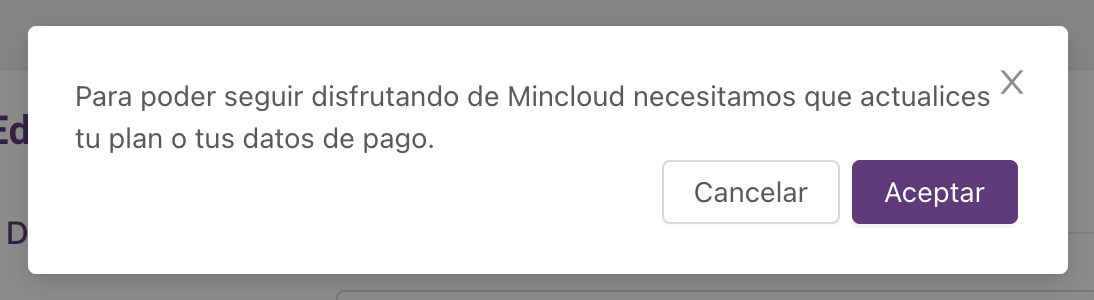
This is how the error message will look, once the user hit the "Aceptar/Ok" button will be redirected to the new feature
 This requires the 1.1.9 version or greater
## Executing Store Procedure from Hooks
```javascript theme={null}
//import a database connection
const dbApp = require("../modelsapp/db").default
const ReplicarDatos = async (instance) => {
//pass a transaction configuration in case you need it
await dbApp.query(`exec ReplicarDatos '${instance.Id}'`, { transaction: options.transaction })
}
ReplicarDatos(instance);
```
*You can know more about queries here* [*https://sequelize.org/master/manual/raw-queries.html*](https://sequelize.org/master/manual/raw-queries.html)
## Other Import examples
```javascript theme={null}
const axios = require("axios").default;
const sortBy = require("lodash/sortBy");
```
## Troubleshooting
* Timeout doing database operations on the `afterSave` or any other *after* hook
Solution: Add the transaction to the operation as the second parameter
```javascript theme={null}
await modelsapp.Usuario.create(data, { transaction: options.transaction });
```
This requires the 1.1.9 version or greater
## Executing Store Procedure from Hooks
```javascript theme={null}
//import a database connection
const dbApp = require("../modelsapp/db").default
const ReplicarDatos = async (instance) => {
//pass a transaction configuration in case you need it
await dbApp.query(`exec ReplicarDatos '${instance.Id}'`, { transaction: options.transaction })
}
ReplicarDatos(instance);
```
*You can know more about queries here* [*https://sequelize.org/master/manual/raw-queries.html*](https://sequelize.org/master/manual/raw-queries.html)
## Other Import examples
```javascript theme={null}
const axios = require("axios").default;
const sortBy = require("lodash/sortBy");
```
## Troubleshooting
* Timeout doing database operations on the `afterSave` or any other *after* hook
Solution: Add the transaction to the operation as the second parameter
```javascript theme={null}
await modelsapp.Usuario.create(data, { transaction: options.transaction });
```