Submit
Allows submitting a Form. Only works in the Form Context.Navigation
Allows to navigate to a different feature Configurations- Open/Close in a modal: Configure to open or not the feature in a modal
- Feature: Allows to select the feature I want to navigate
- Dynamic Feature: This Allows to add a custom code to open features dynamically. The custom function added here must return a valid Feature Id
- Params: List of params to be passed to the feature.
Custom Function
Allows to execute a custom codeGraphql
Allows executing a Graphql endpoint. Here you should use the Datasource generatorImport
Allows to add an Import Excel action Configurations:- Hook: Hook to be executed once the excel file is loaded
- Success message: Message to be displayed after the file is imported succesfully
Export
Allows to export excel files Configurations- Use Data Grid Filter: This is useful when you want to export data based on the Data Grid Items. This only works when the action is a Global Action in a Data Grid
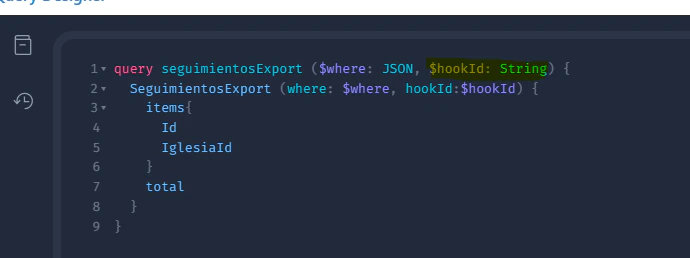
- Data source: You must configure a data source to determine the data you want to export. This is how an export data source looks like:
- All export data sources are prefixed by the
Exportkeyword - If you want to use the Data Grid filter you must define the $where variable in the data source like the example above
The export process is async, you will receive a notification once the process ended. In the notifications drawer, you will find the link to download the file 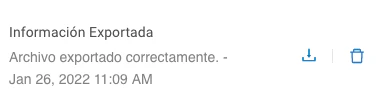
Personalize your exported file and/or data
If you want to personalize the data you export or how the excel file is built you can implement a hook for the export endpoint with the following configurations- Type: Choose
Export - Table: Choose the table you want to customize, for instance
Movimientoslike the above example - Code: hook implementation
Personalize Exported Data and Excel File with one example:
To customize the data exported and the structure of the Excel file generated, you can implement a hook for the export endpoint with the following configurations:- Type: Choose Export
- Table: Select the table you want to customize, e.g., Movimientos.
- Code: Implement the hook as shown below.
Use a specific hook for your export action
If you have multiple hooks for the same Entity, you can specify which hook you want to use to export your data For doing that you would need to specify the hook identifier in the export data source configuration and the button configurations. Use the hook name (exportMovimientos, for example); the hook _id also works, but prefer the name — see Referencing a hook.
- Set a hook for a specific export action\
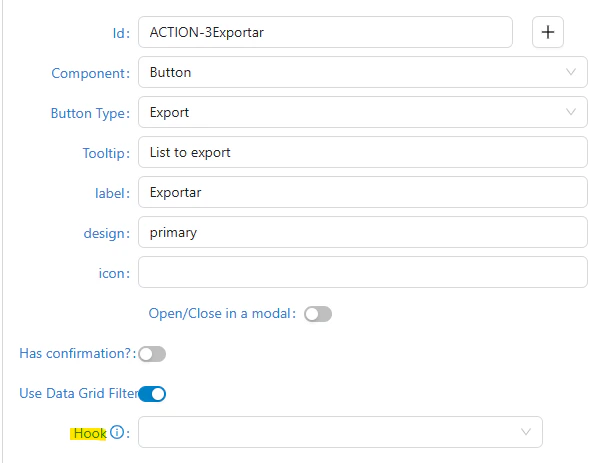
- Then we have to set the variable HookId to graphql (
$hookId: String) query e.g:
\