Hooks types
Common: reusable logic Import: Allows to import excel files Send Notification (web) Scheduled Jobs Generate QR CodeReferencing a hook
Anywhere the platform asks for a hook identifier (for examplecustomHookId in a
custom query endpoint,
or the before/after transaction hooks of a data source) you can use either:
- the hook name, which is the readable identifier you gave it, or
- the hook
_id(the 24-character Mongo id shown in the hook detail).
_ids, so a reference by _id has to be remapped, while a reference by
name keeps pointing at the local copy of the hook.
A hook referenced this way only runs from its own table: customLead with
customHookId can run the custom endpoint hooks of the Lead table, and the same
applies to customEntityQuery and to the before/after transaction hooks of a
mutation. Referencing a hook of another table returns Hook not found; call the
operation of the hook’s table instead (for example customUsuario for a hook of
Usuario). Hooks without a table still run from any table.
The hook pickers in the designer (for example the import/export buttons) save the
name. Configurations created before this change still hold the _id: they keep
working as they are, and the picker shows the hook they point to. Selecting a hook
again replaces the stored _id with the name.
Configurations that still hold an _id can also be migrated in bulk: the platform can run a
one-off migration for your application that rewrites the stored _ids (in features, feature
versions and hook code) to the corresponding hook name. It is opt-in — ask the Codenull team to
run it — and until it runs the existing references keep working exactly as they are.
Roles
Avoid hardcoding a role’sId inside a hook. Roles live in the SQL Server Rol table — the Id
itself is stable across clones and environments of the same application, but it isn’t readable or
auditable in a hook’s code, and it’s specific to this app’s role catalog.
Every role also has a Codigo, generated automatically from its name when the role is created and
never changed afterwards — not even if the role is later renamed (see
Authorization: Role Codigo). Prefer resolving roles by
Codigo with getRoleByCodeAsync/getRolesByCodesAsync from ./utils/roleResolver: both are
cached for 5 minutes, so calling them on every hook execution is safe. Both resolve the full row
(Id, Nombre, Codigo) instead of just the Id, so you can read any other column of the role you
just looked up — its current Nombre for a message, for example — without a second query.
getRolesByCodesAsync resolves several role codes in one call — useful to build a list of target
role ids, for example when calling sendNotification with rolesTo:
Hook context (instance and options)
Table hooks run as a callback with the signature async (instance, options) => { ... }:
instance: the record that triggered the hook. Access its fields withinstance.dataValues.<Field>.options.transaction: the active database transaction. Pass it to any additional query you run inside the hook (see Troubleshooting).options.session?.userInfo: the authenticated user that triggered the event.options.clientIp: IP address the request was made from, resolved from the reverse proxy headers. It can benullwhen there is no originating request (for example, scheduled jobs).
options object (session, clientIp) is also available in before/after transaction hooks and in custom endpoint hooks.
Send Emails
- From: Email address from where you want to send the email, It is not required if was configured in the application designer
- To: Email address of the destination person
- Subject: Subject of the email (text plain)
- Message: The body of the email can be in HTML format or Text Plain.
To know more about the allowed email options please read nodemailer docs
Documentation for Sending Emails with Base64 Attachments (backend, hooks)
Override email provider settings
If you want to use a different mail provider you can pass that configuration as a second parameter of the sendEmail functionAsync Logic
Querying and importing database model
To see more querying examples you can use any sequelize method: https://sequelize.org/v4/manual/tutorial/querying.html
Hooks Errors
This section will show you how to throw hook errors. The simplest way to throw an error looks like this🔁Redirecting to a different Feature
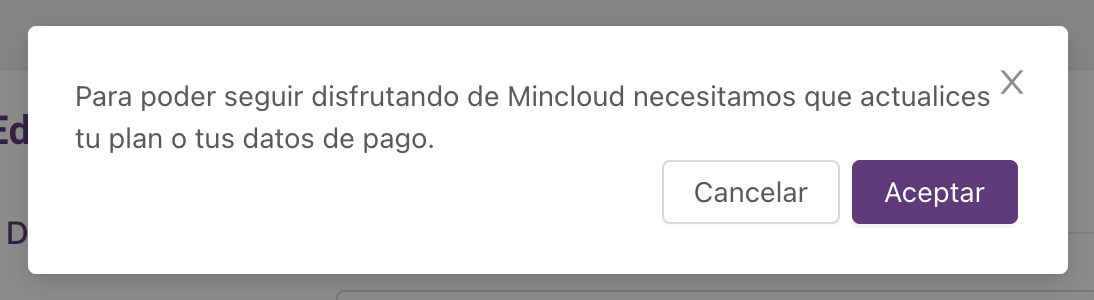
If you want to allow the user to see a modal with a button that redirects to a new Feature, you should throw an exception using theCodenullError class with the following parameters:
✅ Example:
💡This is how the error message will look, once the user hit the “Aceptar/Ok” button will be redirected to the new featuretype: "navigation"is mandatory to trigger the redirect behavior. Theparamsarray allows dynamic values to be passed to the destination feature
Executing Store Procedure from Hooks
Other Import examples
Troubleshooting
- Timeout doing database operations on the
afterSaveor any other after hook