- Execute every
xtime. For instance: Every hour, every 5 minutes, etc - Execute at a specific hour or day. For instance: Every day at 6 AM, Every first month day.
- During your custom code (in hooks) you can schedule a Job. For instance, after 10 days I created a lead I want to send an email or notification or whatever.
How to create a Scheduled Job
It’s simple, go to hooks, create a new one and select the “Scheduled Job” type. Once you select this option on the “Type” dropdown you will see the next fields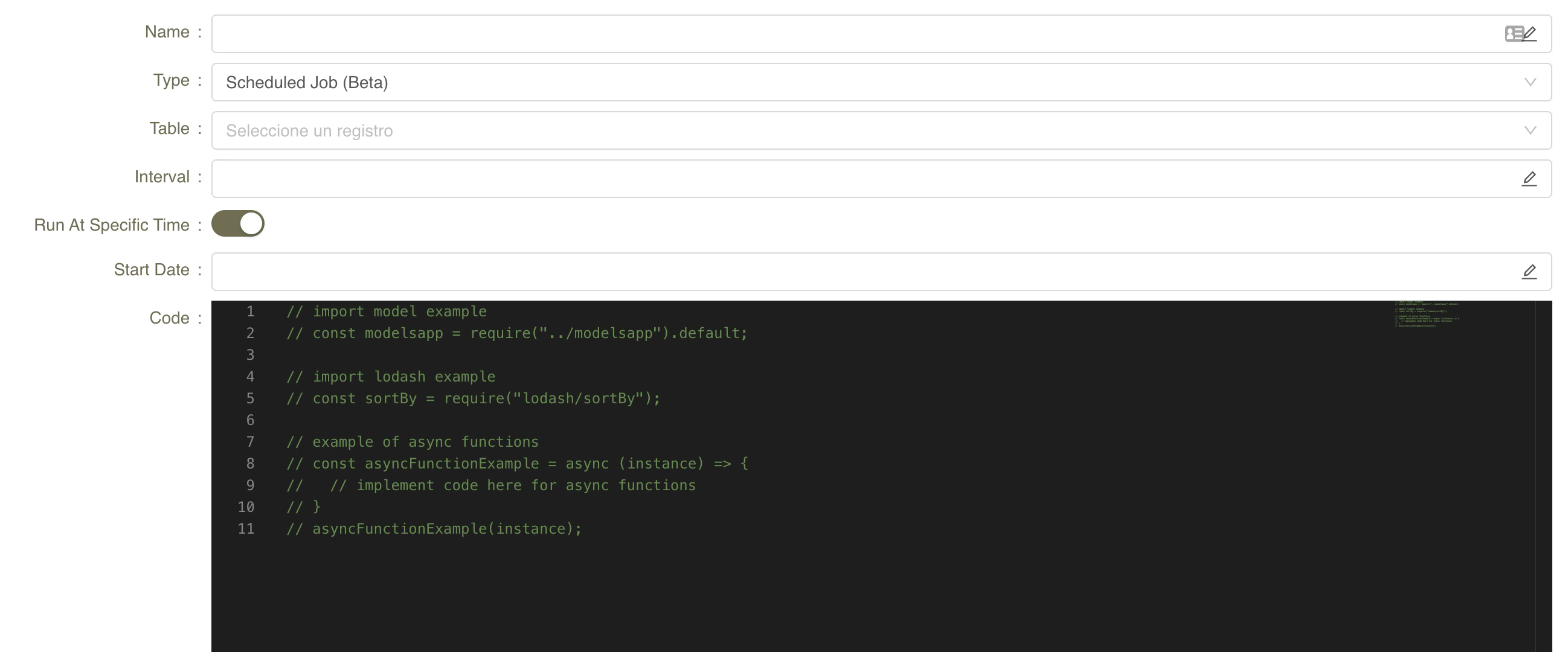
- Interval: Parameter to determine when to execute the Job
- Run At Specific Time: Active this if you want to run the job at any specific time or day
- Start Date: Set this when “Run At Specific Time” is active to determinate the initial execution, from this date the job will be executed using the interval param
- Code: The code that will be executed during the Job execution.
Every x Time
If you only want to execute a Job every x time you only need to set the interval field.
To define the interval field you can define it as a human-interval format, for instance
Run At Specific Time
If you want to run at any specific time you need to configureinterval, run a specific time, and start date fields.
You can configure the start date field for instance like:
Create a Job from Hooks
If you want to create jobs dynamically from hooks, you need to do 2 steps- Create a
Jobin Hooks Manager- Mark the
Dynamic Dateoption - Take note of the name you gave it — that is the identifier you pass to
createJobAsync. The hook_idalso works, but prefer the name: see Referencing a hook.
- Mark the
- Call that Job from the hook you want to use it